Pastel Seamless Papers Pack 4 Green Mix: A Practical Guide for Creators
If you’re a fan of the pastel aesthetic, then you’ll love these seamless digital papers. The Pastel Seamless Papers Pack 4 Green Mix offers a curated collection of soft, soothing tones that have become increasingly popular in modern design trends. Whether you are a seasoned graphic designer looking to add texture to a web layout or a hobbyist crafter preparing for a wedding season, this pack provides a versatile foundation for your projects. However, before you download and start tiling, it is essential to understand what you are actually buying and how to use these assets effectively to avoid common pitfalls.
Understanding What You Are Buying
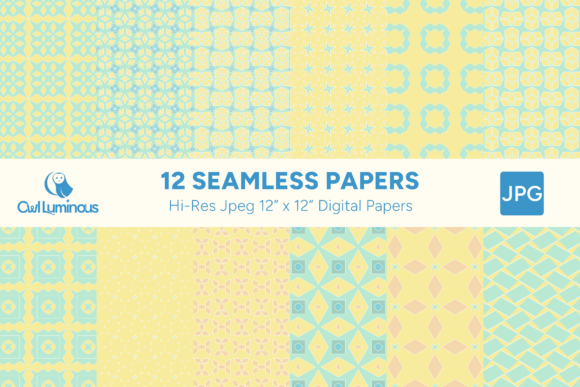
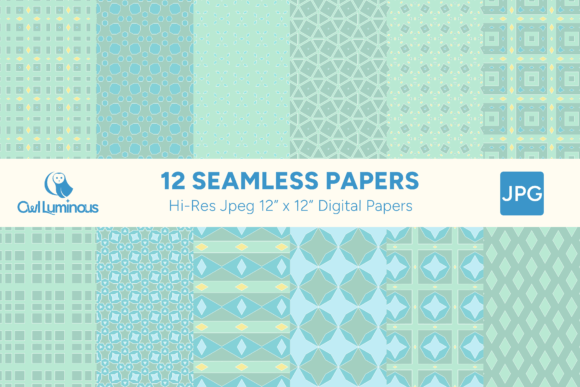
One of the most frequent misunderstandings among new digital asset buyers is the nature of the product itself. It is crucial to note that this is a digital product; no physical items are provided. When you purchase the Pastel Seamless Papers Pack 4 Green Mix, you are acquiring a zipped folder containing 12 high-resolution JPG files. These are not printed sheets of paper delivered to your door, nor do they include promotional mockups or finished designs in the main package. Promotional images and designs shown on listing pages are for illustrative purposes only and are not included in the download.
This distinction matters because it affects your workflow. If you expect ready-to-print large format posters without any editing, this pack will not meet those needs directly. Instead, these files are raw materials designed to be integrated into your own creative process. They are meant to be used as is or tiled to create repeating seamless patterns. Understanding this upfront saves time and sets realistic expectations for the effort required to achieve your final result.
Technical Specifications and Compatibility
To ensure these papers work seamlessly with your existing software, you need to look at the technical specifications. The pack consists of 3,600-pixel wide images at 300 DPI (dots per inch) in JPG format. While JPG is a universally compatible format that opens in most graphics software—from Adobe Photoshop and Illustrator to Canva and GIMP—it does come with limitations compared to lossless formats like PNG or TIFF.
The Mistake: Many users assume that because a file is "high resolution," it can be scaled infinitely without quality loss. While 3,600 pixels is substantial for most screen-based and standard print applications, stretching a JPG pattern beyond its native dimensions too far can introduce compression artifacts or blurriness, especially if the original image had complex gradients or fine details.
The Better Approach: Always check the pixel dimensions against your intended output size. For web headers, social media backgrounds, or standard business cards, 3,600 pixels is more than sufficient. If you plan to use these for large-format printing, such as a wall mural or a large banner, you may need to upscale the image using specialized AI upscaling tools or source higher-resolution assets. Additionally, always keep a backup copy of the original unzipped files. Editing compressed JPGs repeatedly can degrade quality over time; working from the master file ensures the best possible outcome.
Common Application Errors
Once you have the files, the next challenge is application. The versatility of seamless papers is their greatest strength, but also their biggest trap. Users often dive straight into tiling without considering the context of the design.
Ignoring Tile Alignment
A seamless pattern relies on perfect edge matching. If you import the JPG into your design software and simply place it, you might notice a visible seam where the left and right edges meet. This breaks the illusion of continuity. To avoid this, use the "Pattern" or "Tile" function in your software. In Photoshop, for example, going to Edit > Define Pattern allows you to store the tile, which can then be applied via Fill Layers. This method ensures that the software handles the repetition mathematically, eliminating visible seams.
Overlooking Color Profiles
JPG files typically embed an sRGB color profile, which is ideal for web and digital display. However, if you are designing for professional offset printing, relying solely on sRGB can lead to dull or shifted colors when converted to CMYK. Before sending your design to a printer, always convert your document to the appropriate CMYK profile and preview how the pastel greens interact with other elements in that space. Pastels can sometimes appear washed out in print if not adjusted correctly.
Misjudging Scale
Scale is perhaps the most critical element in using patterned papers. A subtle texture that looks elegant on a greeting card can look chaotic and overwhelming on a website background. Conversely, a bold pattern might disappear entirely if scaled down too small for a mobile header. Always preview your design at actual size. If you are using these papers for fabric printing, remember that the repeat unit must align with the fabric width and grain line, which requires additional planning beyond simple digital tiling.
Strategic Use Cases and Best Practices
The possibilities are huge with seamless patterned papers. Here is how to apply them strategically across different mediums:
- Social Media & Web Design: Use these papers as background layers for Instagram stories, Pinterest pins, or website hero sections. Overlay text boxes with solid colors to ensure readability. The soft green mix works particularly well for wellness, lifestyle, and eco-friendly brands.
- Printed Collateral: For invitations, thank-you cards, and business cards, ensure you leave enough margin for cutting. Seamless patterns should ideally extend slightly beyond the bleed area to prevent white edges after trimming.
- Crafting & Scrapbooking: If you are printing these for physical crafts, test a small sample first. Monitor settings can affect how ink interacts with paper stock. Matte finishes often enhance the pastel aesthetic, while glossy finishes can cause glare under flash photography.
- Digital Products: Entrepreneurs can use these textures as backgrounds for online course thumbnails, eBook covers, or digital planners. Consistency in texture helps build a recognizable brand identity.
Final Checklist Before You Start
Before diving into your project with the Pastel Seamless Papers Pack 4 Green Mix, take a moment to verify the following:
- File Integrity: Ensure the ZIP file extracted correctly and all 12 JPGs are present and viewable.
- Software Readiness: Confirm your graphics software supports the file size and format. Most modern tools handle 3,600px JPGs easily, but older versions might struggle.
- Usage Rights: Review the license agreement. Most digital paper packs allow for both personal and commercial use, but some restrict resale of the unaltered files. Always design something new rather than just redistributing the JPGs.
- Backup Plan: Keep the original download. If you lose the files later, you won’t want to pay for them again.
Thank you for checking out this set. By understanding the technical nuances and avoiding common application errors, you can maximize the value of the Pastel Seamless Papers Pack 4 Green Mix. Please do leave a review if you find these resources helpful, and I’d love to see what you use these for. You can also follow me for future updates on new collections and design tips. Remember, the key to great design is not just the asset you choose, but how thoughtfully you integrate it into your overall vision.